FabCon Europe 2026 in 18 demos · Part 10 of 18 · Agents
Ontology in Fabric IQ: business rules an agent can read, not run
The ontology agent drafts entity types, relationships, and metrics from a semantic model, validates the draft, and writes nothing until you switch to Act mode.
The ontology (preview) item in Fabric IQ is a shared, machine-readable model of your business. It defines entity types, properties, relationships, metrics, and rules, and binds them to data that stays in its source. You can build one, import one, or generate one from a Power BI semantic model.
Agents across FabCon Europe 2026 in 18 demos answer from your data, and an ontology gives them definitions instead of column names. It also comes with a date: the previous ontology experience retires on January 31, 2027.
In short
- An ontology defines entity types, relationships, metrics from DAX measures, and natural-language rules, bound to Fabric sources. Data stays in its source.
- The ontology agent starts in Plan mode and writes nothing until you switch to Act. It runs as you, under your permissions.
- Rules are context for agents, not enforcement. The feature is preview, and the previous ontology experience retires on January 31, 2027.
What an ontology in Fabric IQ is and how it works
Ontology is the business context layer between data and the experiences that use it. An entity type such as Formula has properties mapped to source columns, and relationships connect entity types. Metrics come from DAX measures that the semantic model keeps owning. Rules are natural-language statements linked to ontology concepts.
Consumers query the live source through the bindings. Documents enter as files attached to the agent chat, up to 10 files of 5 MB each.
The ontology agent uses your identity. Generating from a semantic model needs Read and Build on it, and querying respects OneLake security, RLS, OLS, and CLS on bound data. Viewers can explain and query an ontology. Applying changes needs Contributor or higher.
Built from
- Semantic modelsTables, columns, relationships, DAX measures
- Lakehouses and eventhousesTables and time series
- Other Fabric sourcesWarehouses, databases, shortcuts, views
- Files in the agent chatRequirements, data dictionaries
- ImportTTL, RDF, or OWL, into an empty item
Ontology item
- Entity types and properties
- Relationships
- Metrics, owned by the DAX measure
- Rules, in natural language
- Data bindings
Definitions only. Data stays in its source.
Read by
- Ontology agentQueries in DAX, SQL, KQL, or GQL
- Data agents and operations agentsAs grounding context
- Real-Time DashboardsOntology as a source
- MCP clientslist_ontology_rules, read-only
- ExportTurtle or RDF/XML, for other graph tools
Runs as you. Read and Build on models. OneLake security, RLS, OLS, and CLS on bound data.
What the Fabric IQ ontology demo shows
One empty item, Oud_RnD_Ontology_EN, and one English prompt. The recording cuts the wait.
- 0:00
- The empty item opens with the Ontology Agent pane. The toggle sits on Plan. Export is greyed out.
- 0:04
- The prompt asks for an ontology from the Oud RnD semantic model: formulas, ingredients, trials, and their relations.
- 0:18
- The agent reads the model: 6 tables, 44 columns, 4 measures, and 5 relationships, all matched.
- 0:20
- Validation passes with no issues: 4 entity types and 3 relationships. The agent asks for Act mode before it applies anything.
- 0:22
- The toggle moves to Act. Second prompt: Apply this plan.
- 0:34
- Apply completed without issues. The canvas shows Formula, Ingredient, FormulaIngredient, and PreferenceTrial. Export is now active.
The runbook expects six entity types and five relationships, from a Polish run. The English run gave four and three. Plans vary between runs, so judge the validation result, not the count.
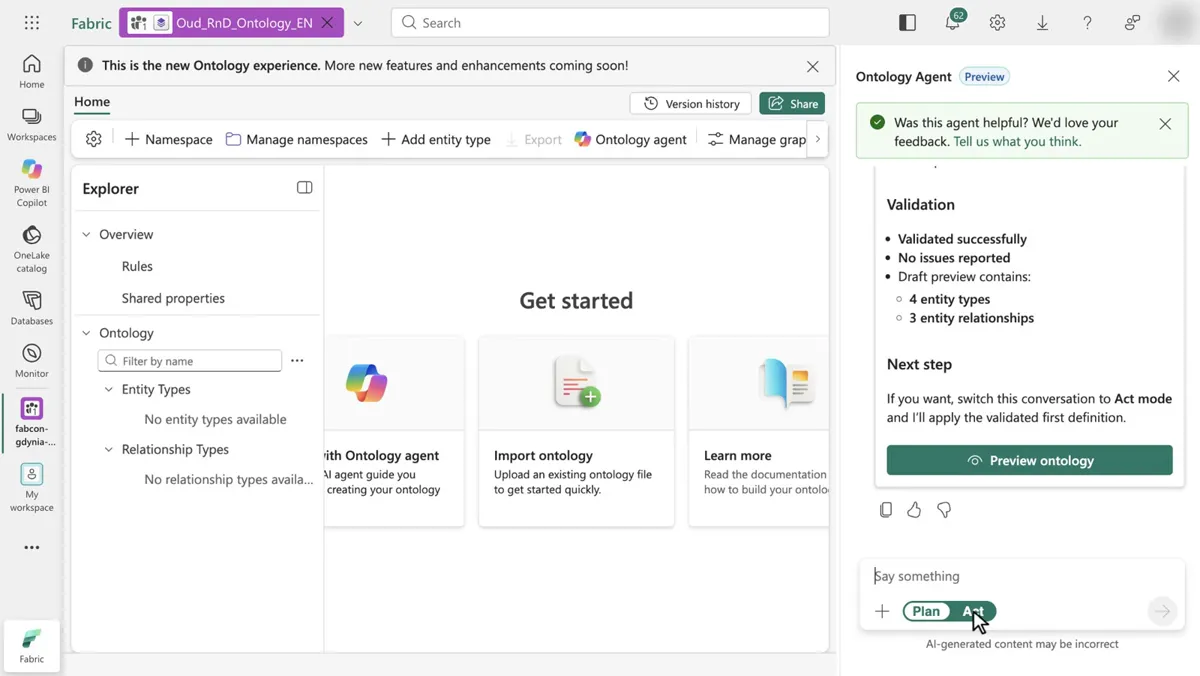
Plan mode and Act mode: the ontology agent checks before it acts
Project Osmos checks after it acts. The ontology agent checks before it acts. Plan mode, the default, discovers, drafts, validates, and previews, and changes nothing. Act mode applies changes and says what it will do first. There is no per-operation undo, only a restore of a version you saved by hand.
Fabric IQ ontology limits and catches
The catch: a rule is a natural-language definition. Ontology does not run the rule against data or execute actions. Agents read rules as context, and acting on them is up to the consumer. The new experience has no Activator integration.
- Generation leaves manual work: time series bindings, missing entity keys, relationship bindings, and friendly names.
- Conversation data can be kept up to two days, without customer-managed keys.
- Outside US and EU Data Boundary capacities, the agent is off until an admin allows cross-region processing.
- Import works only into an empty item, and the RDF round trip is not lossless.
The previous ontology experience retires on January 31, 2027, re-checked on Learn on Nov 3, 2026. The in-product copy makes a separate new item, so consumers need reconnecting.
- NowCopyCreate a new-experience copy. The old item stays.
- NextReconnectPoint agents and dashboards at the new item.
- NextRebuild rulesRecreate rules. Set up Activator separately.
- Jan 31, 2027Old experience retiresOld items stay available only until this date.
The source semantic model has its own AI setting. A Fabric data agent can read an ontology too.
Run the Fabric IQ ontology demo yourself
You need the Oud RnD semantic model from the recap repo setup script, with Read and Build, and the tenant settings Users can create ontology (preview) items and Users can create Fabric items. Create an empty Ontology (preview) item, send prompt 1 in Plan mode, then switch to Act and send prompt 2.
Build an ontology from the Oud RnD semantic model: formulas, ingredients, preference trials, and how they relate.

Apply this plan.
Expected result, per runbook D08: a plan with six entity types and five relationships, then the same entities on the canvas. Time and cost, as the runbook states: about 8 minutes, on the F8 capacity from up.
What to do on Monday
On Monday: Pilot the ontology on one semantic model that already has good descriptions. Do not move production yet.
Key facts at a glance
Checked on Microsoft Learn on November 3, 2026.
| ID | Fact | Source |
|---|---|---|
| K1 | Ontology and the ontology agent are preview. | Learn: Ontology overview |
| K2 | The old ontology experience retires on Jan 31, 2027. | Learn: Ontology overview |
| K3 | With Read and Build on a semantic model: tables become entity types, DAX measures metrics. | Learn: Generate from semantic models |
| K4 | Plan mode writes nothing. Act mode applies. No per-operation undo. | Learn: Ontology agent |
| K5 | Rules are natural language. Ontology does not execute them. | Learn: Business rules |
| K6 | Import TTL, RDF, or OWL into an empty item. Export Turtle or RDF/XML. | Learn: Import and export |
| K7 | Tenant settings: Users can create ontology (preview) items, Users can create Fabric items. | Learn: Tenant settings |
Frequently asked questions
What is an ontology in Microsoft Fabric IQ?
An ontology in Fabric IQ is a preview item that models your business as entity types, properties, relationships, metrics, and natural-language rules. It binds them to Fabric sources such as semantic models and lakehouses without copying the data.
When does the old ontology experience in Fabric retire?
Microsoft Learn states that the old ontology experience retires on January 31, 2027. An in-product action copies an old item into the new experience as a separate item.
Can I generate a Fabric ontology from a Power BI semantic model?
Yes. Select Generate Ontology on the semantic model, or ask the ontology agent in an empty ontology item. Tables become entity types, columns become properties, and DAX measures become metrics. You need Read and Build permission on the model.
Does the ontology agent change my ontology without asking?
No. The ontology agent starts in Plan mode, where it can discover, draft, validate, and preview but changes nothing. It applies changes only after you switch to Act mode. There is no per-operation undo, so save a version before you apply.
Do business rules in a Fabric IQ ontology enforce anything?
No. A rule is a natural-language definition linked to entity types, properties, or relationships. Ontology does not run rules against data or execute actions. Agents can read rules as context, for example through the read-only list_ontology_rules MCP tool.
Sources
Microsoft Learn and the Microsoft Azure blog, checked on November 3, 2026.
- What is ontology (preview)?
- Generate an ontology (preview) from semantic models
- Use the ontology agent (preview) in Fabric
- Create and manage business rules in ontology (preview)
- Import and export ontologies (preview)
- Required tenant settings for ontology (preview)
- FabCon and SQLCon 2026 in Barcelona, Microsoft Azure blog
- Runbook D08, FabCon Barcelona 2026 recap repo