FabCon Europe 2026 in 18 demos · Part 16 of 18 · Security and governance
OneLake catalog Govern: one screen for labels, DLP, and settings
The Govern tab turns tenant metadata into insights and recommended actions, once a day for admins and on demand for the owners of each item.
The Govern tab of the OneLake catalog is the central place in Microsoft Fabric to assess and improve the governance of your data estate. It shows governance insights, such as sensitivity label coverage and DLP scan results, recommended actions with steps, and links to domains, policies, tenant settings, capacities, and workspaces. Fabric administrators see the whole tenant. Data owners see their own items. This post is part of FabCon Europe 2026 in 18 demos.
Govern is a detective control. It shows what drifted after it drifted, with up to a day of lag, so it pairs with preventive controls rather than replacing them.
In short
- Govern shows tenant-wide insights on inventory, sensitivity labels, DLP scans, freshness, endorsement, and sharing, plus recommended action cards with steps.
- The estate view reads admin monitoring storage, refreshed once a day. Tables inside items, guest users, and tenants with Private Link are not covered.
- Treat each recommended action as a backlog row with an owner and a scope, and recheck it after the next daily refresh.
What the OneLake catalog Govern tab shows and where its data comes from
Govern has two views. All data in Fabric is the default for anyone with tenant-wide visibility and draws on metadata from items through workspaces to capacities and domains. My items covers the items you own. A domain selector scopes the insights and actions to one domain or subdomain.
The two views read different sources. The estate view uses admin monitoring storage, which Fabric creates in the Admin monitoring workspace the first time you open Govern. It refreshes once a day. The My items view uses a governance report in your My workspace that refreshes each time you open Govern.
Behind View more, the estate report has three tabs. Manage your data estate covers inventory, capacities, domains, and feature usage. Protect, secure & comply shows sensitivity label coverage, including the share of unlabeled items, and which workspaces and items DLP policies evaluated. Discover, trust, and reuse covers freshness, curation, descriptions, endorsement, and sharing.
Govern is also the doorway to the controls. It links domains, tags, endorsement, metadata scanning, cross-tenant sharing discovery, and Fabric policies, plus capacities, workspaces, and tenant settings under Configurations.
What the OneLake catalog Govern demo shows
- 0:00 The OneLake catalog opens on Explore. Among the items sits a semantic model in the Admin monitoring workspace whose name starts with "OneLake Catalog - Governan". That is the estate model behind Govern.
- 0:02 The cursor selects Govern. Gray placeholders appear.
- 0:04 "Your organization-wide data estate in Fabric at a glance" loads with the line "We're refreshing this screen with your latest insights and recommended actions."
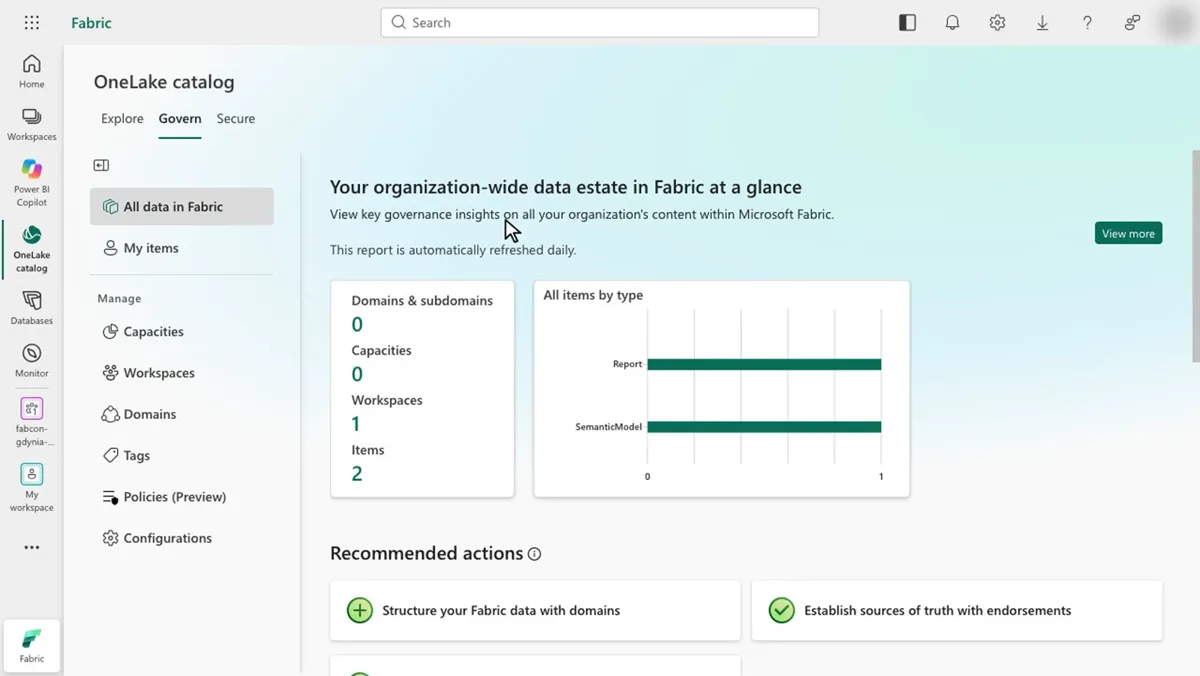
- 0:06 The tiles appear under the note "This report is automatically refreshed daily": 0 domains and subdomains, 0 capacities, 1 workspace, 2 items, and a chart of items by type with Report and SemanticModel.
- 0:08 Recommended actions show three cards: "Structure your Fabric data with domains" with a plus sign, then "Establish sources of truth with endorsements" and "Enhance data curation with tags", both with a check mark.
- 0:10 Below sits Quick access, with Admin monitoring workspaces and Manage users. The cursor rests on the domains card until 0:20.
The tiles do not match the Explore list from 0:00, which showed more items. That is the daily snapshot at work, and it sets up the biggest catch below.
OneLake catalog Govern limits and blind spots
The catch: the estate view is a daily snapshot. Insights, recommended actions, and View more reports all read admin monitoring storage, which refreshes once a day. Learn says it takes a day to see all changes made in the organization. Never use the tiles to confirm a fix you made an hour ago.
- Subitems such as tables are not supported and do not appear in insights.
- Govern does not support cross-tenant scenarios or guest users.
- Govern is not available when Private Link is activated.
- Charts leave out the items of third-party workloads.
- Everyone who views content in the Admin monitoring workspace needs Power BI Pro, unless the workspace sits on a capacity.
- Do not edit the autogenerated report or semantic model. Copy the report, or build a new one on the model. The estate model is read-only and does not work with Fabric data agents.
How to turn Govern recommended actions into a backlog
Each card opens to an insight that highlights the issue, an explanation of why it matters, and steps to address it. In the My items view, it also lists every related entity and opens each one in one click. That is most of a ticket already.
| ID | On the recommended action card | In your backlog row |
|---|---|---|
| B1 | Insight that highlights the issue | Problem, with the number and the date of the last refresh |
| B2 | Why the issue matters | Rationale, copied as is |
| B3 | Steps to address the issue | Tasks, one per step |
| B4 | Related entities, in the My items view | Scope: the items and workspaces to touch |
| B5 | Not on the card | Owner: a domain admin or the item owner |
| B6 | Not on the card | Recheck: the day after the fix, past the next refresh |
| B7 | Not on the card | Prevention: a policy or tenant setting, if the card returns |
Three rules keep the backlog workable. Write one row per card per domain, so each row has one owner. Recheck after the next daily refresh, never the same day. When a card comes back a third time, stop fixing instances and add a preventive control, such as a Fabric policy. To pull the affected items into a script, the OneLake catalog search API finds them from code.
In the demo tenant, the card with the plus sign, structuring data with domains, would become the first row, owned by the Fabric administrator.
Run the OneLake catalog Govern demo yourself
You need the Fabric administrator role for the All data in Fabric view. Data owners see My items. Steps from runbook D13:
1. Open OneLake catalog and select the Govern tab.
2. Read the insights. The report refreshes once a day, and the first open takes a few minutes.
3. Scroll to Recommended actions.
Expected result: governance insights, domains and subdomains, and recommended actions such as structuring data with domains. Time and cost: about 2 minutes, no Fabric capacity needed.
What to do on Monday
On Monday: Turn on OneLake catalog Govern, open it Monday morning, and review the recommended actions.
Write down the tile values on that first Monday. Next week's review compares against them.
Key facts at a glance
Checked on Microsoft Learn on November 3, 2026.
| ID | Fact | Source |
|---|---|---|
| K1 | The OneLake catalog Govern experience is GA since September 2026. | Learn: What's new in Microsoft Fabric |
| K2 | Two views: All data in Fabric for tenant-wide visibility, My items for the items you own. | Learn: Govern your data with the OneLake catalog |
| K3 | Estate insights come from admin monitoring storage, created in the Admin monitoring workspace on first open. | Learn: Govern your data with the OneLake catalog |
| K4 | Estate data refreshes once a day. My items refreshes on every open and has a Refresh button. | Learn: Govern your data with the OneLake catalog |
| K5 | Not covered: subitems such as tables, cross-tenant scenarios, guest users, third-party workload items in charts. | Learn: Govern your data with the OneLake catalog |
| K6 | Not available when Private Link is activated. | Learn: Govern your data with the OneLake catalog |
| K7 | Viewers of Admin monitoring workspace content need Power BI Pro unless the workspace is on a capacity. | Learn: Govern your data with the OneLake catalog |
| K8 | The Policies center for Fabric policies lives on the Govern tab. | Learn: What are Microsoft Fabric policies (preview)? |
Frequently asked questions
What is the Govern tab in the OneLake catalog?
The Govern tab is the central place in Microsoft Fabric to assess and improve the governance of the data estate. It shows governance insights, recommended actions, and links to domains, tags, endorsement, policies, tenant settings, capacities, and workspaces. It is generally available as of November 3, 2026.
How often does OneLake catalog Govern refresh?
The All data in Fabric view reads admin monitoring storage, which refreshes automatically once a day. Microsoft Learn says it takes a day to see all changes made in the organization. The My items view refreshes each time you open the Govern section and has a Refresh button.
Who can see the All data in Fabric view in Govern?
Users with tenant-wide visibility, such as Fabric administrators, see the All data in Fabric view by default. Data owners see the My items view with insights on the items they own. Domain admins and capacity admins see Domains or Capacities in the menu.
Does OneLake catalog Govern cover tables and columns?
No. Subitems such as tables are not supported and do not appear in the insights. The insights work at the level of items, workspaces, capacities, and domains.
Why is the Govern tab missing or empty in my tenant?
Govern is not available when Private Link is activated, and it does not support cross-tenant scenarios or guest users. It is also rolling out by region, with the Admin portal as the fallback. The first open can take a few moments while Fabric builds the insights.
Can I customize the Govern reports?
Yes, but leave the originals alone. Copy the autogenerated report, or build a new report on the autogenerated semantic model. Microsoft Learn warns that changing the original report or semantic model can stop the Govern experience from working.
Sources
Microsoft Learn and the recap repository, checked on November 3, 2026.
- Govern and manage your Fabric data estate with the OneLake catalog
- OneLake catalog overview
- Admin monitoring workspace
- What are Microsoft Fabric policies (preview)?
- What's new in Microsoft Fabric
- Runbook D13: OneLake catalog Govern (recap repository)
- FabCon Europe 2026 recap: status table and FAQ (recap repository, status as of October 21, 2026)