FabCon Europe 2026 in 18 demos · Part 17 of 18 · Engineering building blocks
AI functions in Spark: translate, classify, and score sentiment in one line
Three model calls chained on one DataFrame column, with no API key, billed to your capacity.
AI functions in Microsoft Fabric are DataFrame methods that send each value of a text column to a large language model and write the answer to a new column. You call df.ai.translate(), df.ai.analyze_sentiment(), or df.ai.classify() in a pandas or PySpark notebook. A built-in endpoint serves the model, so you need no Azure OpenAI resource and no API key.
This note covers demo 15 of FabCon Europe 2026 in 18 demos: text enrichment that runs where the data sits.
In short
- One line per function enriches a column through a built-in endpoint: no API key, gpt-5-mini by default, billed on the Copilot and AI meter.
- Column values go to Azure OpenAI in the US or the EU Data Boundary. Capacities elsewhere, the UK included, need an admin to allow cross-geo processing.
- Bring your own Azure OpenAI or Foundry resource for another model, provider billing, or a resource you control. You then manage a key.
What Fabric AI functions are and how they work
Learn lists nine AI functions. Each is a prebuilt model transformation that takes a column plus options such as a target language or labels.
The PySpark version runs as a distributed Spark transformation. Each worker sends rows as asynchronous requests, 200 at a time by default and up to 1,000 with concurrency. The pandas version runs on one node. Each call adds an output column, null when the model can’t decide, and an error column. PySpark results keep the df.ai accessor, so the demo chains three calls in one expression.
Learn supports AI functions on Fabric Runtime 1.3 and later. Setup differs by API and runtime:
| ID | API and runtime | Import | Install first |
|---|---|---|---|
| V1 | PySpark, any Fabric Spark runtime | synapse.ml.spark.aifunc | Nothing |
| V2 | pandas, other PySpark runtimes | synapse.ml.aifunc | Nothing for most usage |
| V3 | pandas, Runtime 2.0 | synapse.ml.aifunc | nest_asyncio, temporarily |
| V4 | pandas, Python runtime | synapse.ml.aifunc | Two SynapseML wheels |
| V5 | Either API, Runtime 2.0 | Both | A cell that sets the model |
What the AI functions demo shows
One Run all on eight synthetic tester comments about oud formulas OB-101 to OB-106.
- 0:00 Cell 1 of 04_ai_functions imports
synapse.ml.spark.aifunc, sets gpt-5-mini with low reasoning effort, and builds the DataFramecomments. - 0:02 Run all. At 0:04 a notice reads “Session started in 5 sec.”
- 0:05 Cell 1 returns 2 columns and 8 rows. Cell 2 starts, and the wait is sped up.
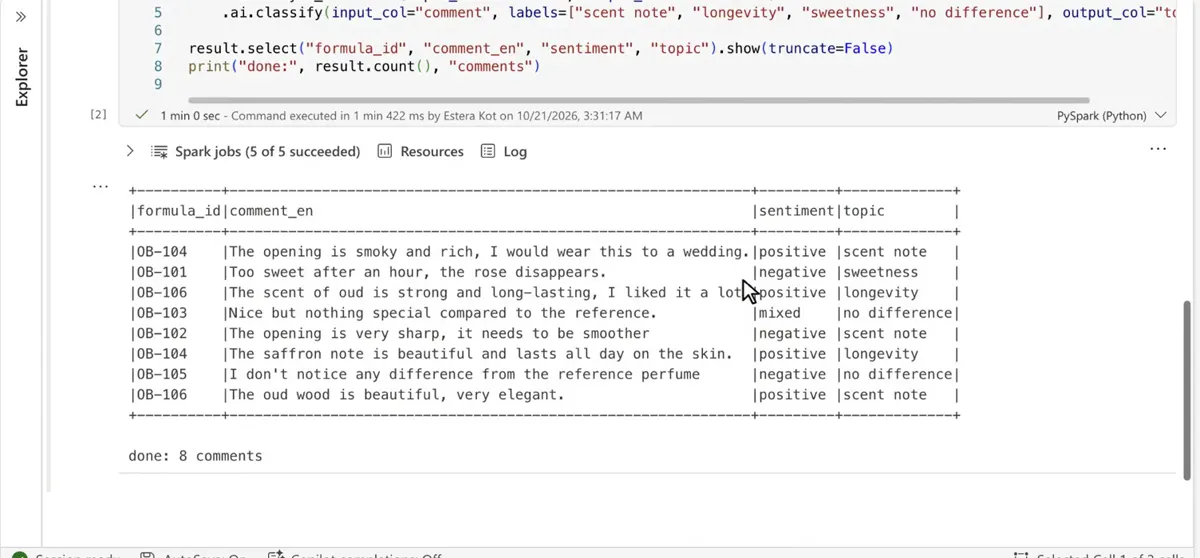
- 0:14 Cell 2 chains the three functions. Its status line shows the real run time, 1 min 0 sec.
- 0:15 The result prints, then “done: 8 comments,” on screen until 0:28.
Arabic and French comments return in English. OB-106’s Arabic comment reads “The scent of oud is strong and long-lasting, I liked it a lot,” positive, longevity. English passes through unchanged.
OB-105, “I don’t notice any difference from the reference perfume,” scores negative where a reviewer could say neutral. Learn’s examples say: “Always review output for mistakes.”
What AI functions cost
AI functions need F2 or larger, or any P SKU, and the tenant setting “Users can use Copilot and other features powered by Azure OpenAI,” on by default. Trial SKUs can’t use the built-in endpoint.
Spark compute bills on the Spark meter. Model calls bill on the Copilot and AI meter, as the operation “AI Functions” in the Capacity Metrics app, in CU seconds per 1,000 tokens:
| ID | Model | Input | Cached input | Output |
|---|---|---|---|---|
| R1 | gpt-5-mini, default | 8.40 | 0.84 | 67.23 |
| R2 | gpt-5.1 | 42.02 | 4.20 | 336.13 |
Output costs about eight times as much as input, and Learn says rates can change. Read ai.stats on the result for token counts and failed rows.
Where your text goes
AI functions send cell values to the model. Your capacity’s geography decides where the built-in model runs.
- USUSNone
- EU Data BoundaryEU Data BoundaryNone
- UKEU Data BoundaryEnable cross-geo processing
- Ten other geographiesAustralia, Brazil, Canada, India, Asia, Japan, Korea, South Africa, Southeast Asia, United Arab EmiratesUSEnable cross-geo processing
The cross-geo setting is “Data sent to Azure OpenAI can be processed outside your capacity’s geographic region, compliance boundary, or national cloud instance,” off by default. Learn states that AI functions don’t log or store prompts, inputs, or outputs.
When to bring your own model
The pandas and PySpark versions can call any model with the responses or chat_completions API, such as Azure OpenAI or a Foundry model like LLaMA, directly or through Azure API Management.
| ID | Question | Built-in endpoint | Your own resource |
|---|---|---|---|
| E1 | Setup | None | set_URL and set_subscription_key |
| E2 | Model calls billed to | Your capacity | Your provider. Fabric charges none. |
| E3 | Prompts processed in | US or EU Data Boundary | The resource you deploy |
| E4 | ai.embed, ai.similarity | Supported | Not with a custom Foundry resource |
Switch for a missing model, provider billing, or a policy that allows only your own resource. Then read the key from Azure Key Vault at run time.
Limits and catches
The catch: on Runtime 2.0, Learn tells you to set the model, reasoning effort, and temperature in code at the start of every session, as a temporary workaround. The demo’s first cell does exactly that.
- Spark evaluates lazily, and the demo calls
show()andcount()on one result. Learn doesn’t say whether each action calls the model, so write the result to a table once. - Learn lists API calls and ML inference as a poor fit for materialized lake views. Enrich in a notebook step that writes a table, then let the views read it.
For plain-language questions over a lakehouse, use the Fabric data agent.
Run the demo yourself
python3 fabdemo.py up from the recap repo builds the workspace, the lakehouse lh_oud_rd, and the notebook 04_ai_functions on an F8 capacity. With the tenant setting above on, open the notebook, select Run all, and scroll to the result.
# Tester comments from the Doha panel (synthetic data): English, Arabic, French
import warnings; warnings.filterwarnings("ignore")
import synapse.ml.spark.aifunc as aifunc
aifunc.default_conf.set_deployment_name("gpt-5-mini")   # Runtime 2.0: model set explicitly (Learn, temporary)
aifunc.default_conf.set_reasoning_effort("low")
aifunc.default_conf.reset_temperature()

comments = spark.createDataFrame([
    ("OB-104", "The opening is smoky and rich, I would wear this to a wedding."),
    ("OB-101", "Too sweet after an hour, the rose disappears."),
    ("OB-106", "رائحة العود قوية وثابتة، أحببتها كثيراً"),
    ("OB-103", "Nice but nothing special compared to the reference."),
    ("OB-102", "الافتتاحية حادة جداً، تحتاج إلى نعومة أكثر"),
    ("OB-104", "The saffron note is beautiful and lasts all day on the skin."),
    ("OB-105", "لا أشعر بأي فرق عن العطر المرجعي"),
    ("OB-106", "Le bois de oud est magnifique, très élégant.")
], ["formula_id", "comment"])
display(comments)
# One line per AI function: translation, sentiment, topic
result = (comments
.ai.translate(to_lang="english", input_col="comment", output_col="comment_en")
.ai.analyze_sentiment(input_col="comment", output_col="sentiment")
.ai.classify(input_col="comment", labels=["scent note", "longevity", "sweetness", "no difference"], output_col="topic"))
result.select("formula_id", "comment_en", "sentiment", "topic").show(truncate=False)
print("done:", result.count(), "comments")Expected result: eight comments with a translation, a sentiment, and a topic from your labels, then done: 8 comments.
Time and cost: about 4 minutes on that F8 capacity, per runbook D15. The recap README puts F8 at about 1.41 EUR per hour in France Central at the Azure retail price on October 21, 2026.
What to do on Monday
On Monday: Pilot one AI function on one text column in a dev workspace, and read ai.stats for token use before you schedule the notebook.
Key facts at a glance
Checked on Microsoft Learn on November 3, 2026.
| ID | Fact | Source |
|---|---|---|
| K1 | Nine functions, among them translate, analyze_sentiment, and classify | Learn: overview |
| K2 | Default model gpt-5-mini | Learn: overview |
| K3 | F2 or larger, or a P SKU. No trial SKUs. | Learn: Copilot in Fabric |
| K4 | Runtime 1.3 and later, Runtime 2.0 with a temporary setup | Learn: Runtime 2.0 |
| K5 | 200 concurrent rows per worker by default, up to 1,000 | Learn: PySpark configuration |
| K6 | Copilot and AI meter, operation “AI Functions” | Learn: billing |
| K7 | gpt-5-mini: 8.40 CU seconds per 1,000 input tokens, 67.23 per 1,000 output tokens | Learn: billing |
| K8 | Built-in model in the US and the EU Data Boundary | Learn: Copilot in Fabric |
Frequently asked questions
Do Fabric AI functions need an API key?
No, not with the built-in endpoint. Fabric sets it up and bills model calls to your capacity. You need a key only for your own Azure OpenAI or Microsoft Foundry resource.
Which Fabric runtimes support AI functions?
Fabric Runtime 1.3 and later. On Runtime 2.0, Learn prescribes a temporary setup cell that sets the model, reasoning effort, and temperature, plus nest_asyncio for pandas.
How are Fabric AI functions billed?
Built-in model calls consume capacity on the Copilot and AI meter, shown as the AI Functions operation. gpt-5-mini costs 8.40 CU seconds per 1,000 input tokens and 67.23 per 1,000 output tokens. Spark compute bills separately.
Where is my data processed when I use AI functions?
In US datacenters or the EU Data Boundary. US and EU Data Boundary capacities stay in their geography. Capacities elsewhere, the UK included, need the cross-geo processing tenant setting.
Are AI functions in Fabric generally available?
Yes, for pandas and PySpark. The Microsoft Fabric Updates Blog announced GA on November 19, 2025. Multimodal input and warehouse T-SQL functions are in preview as of November 3, 2026.
Sources
Microsoft Learn and the Microsoft Fabric blog, checked on November 3, 2026.
- AI Functions overview
- Billing for AI Functions
- AI Functions in Runtime 2.0
- Customize AI Functions with PySpark
- ai.classify with PySpark
- Copilot in Fabric: available regions
- Copilot and Agent tenant settings
- Release status of AI experiences
- Multimodal AI Functions
- AI Functions in a warehouse
- What’s new in Microsoft Fabric
- Fabric Updates Blog: AI Functions Enhancements (GA) (archived)
- Runbook D15, recap repository, and slides