FabCon Europe 2026 in 18 demos · Part 14 of 18 · Security and governance
Outbound access protection: stop data leaving through shortcuts and agents
One workspace toggle blocks every outbound connection. You then allow destinations one by one, through managed private endpoints or data connection rules.
Workspace outbound access protection is a Microsoft Fabric workspace setting that blocks all outbound connections from the items in a workspace. With it on, data cannot leave through a shortcut, a copy, a notebook, or a data agent unless an admin allowed that destination. Exceptions come in two forms: managed private endpoints and data connection rules. At FabCon Europe 2026, Microsoft extended it to OneLake shortcuts, now GA, and to Fabric data agents, in preview. This post is part of FabCon Europe 2026 in 18 demos.
It is the egress half of a Fabric network design. It also changes how Spark, Python packages, and agents behave in that workspace, so read the side effects before you switch it on.
In short
- One toggle per workspace, Block outbound public access, blocks every outbound connection. You then allow destinations through managed private endpoints or data connection rules.
- OneLake shortcuts and copy operations are covered and GA. Data agents are covered in preview, but not their Azure OpenAI connection, and inbound copies are never covered.
- Turning it on has side effects: Spark loses starter pools and PyPI, Project Osmos does not run, and unsupported items block the toggle.
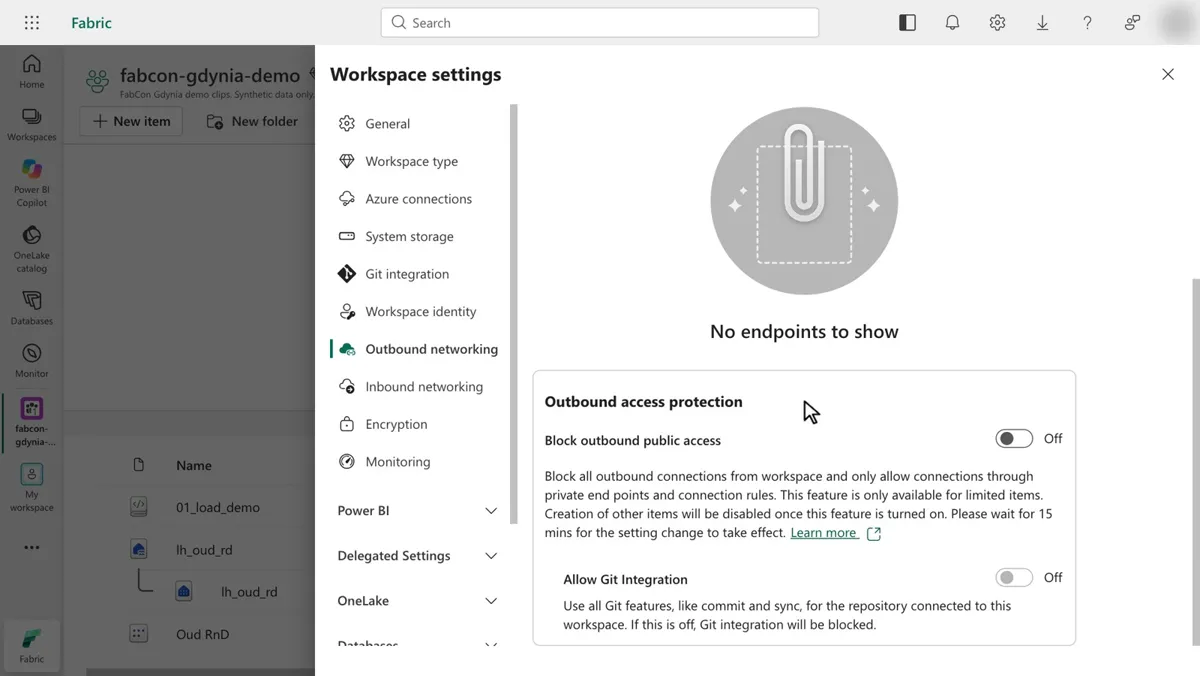
fabcon-gdynia-demo, Outbound networking page: no managed private endpoints, and Block outbound public access left Off. 18 seconds, no sound, recorded Oct 19, 2026.What outbound access protection is and how it works
An outbound request is any request from inside a workspace to another workspace or an external location. Direction is all that counts. Reading from an external store and writing to it both leave the workspace, so both are blocked.
It takes two switches and one prerequisite. A Fabric administrator enables the tenant setting Configure workspace-level outbound network rules, which is off by default. A workspace admin then turns on Block outbound public access in the workspace settings. The workspace must run on an F SKU capacity. Trials and other capacity types are not supported.
From then on, every outbound connection is denied until you allow it. The workload decides how:
| ID | Workload | Exception mechanism | Protected items |
|---|---|---|---|
| W1 | OneLake | Managed private endpoints or data connection rules | Shortcuts and copy operations |
| W2 | Data Engineering | Managed private endpoints | Lakehouses, notebooks, Spark job definitions, environments |
| W3 | Data Factory | Data connection rules | Pipelines, Copy jobs, Dataflow Gen2 with CI/CD |
| W4 | Fabric IQ | Data connection rules | Data agent, operations agent, Graph |
| W5 | Power BI | Data connection rules | Semantic models only |
Learn also lists Real-Time Intelligence, mirrored databases, Data Science, and Data Warehouse items. A data connection rule names an endpoint, such as an ADLS Gen2 account, or a Fabric workspace.
For the Fabric data agent, an outbound request happens when it adds or queries a data source outside its workspace. Calls inside the same workspace stay unrestricted. The agent's Microsoft-managed Azure OpenAI connection is outside the model, and Azure AI Search is not supported yet.
What the outbound access protection demo shows
- 0:00 The demo workspace
fabcon-gdynia-demoholds four items: the notebook01_load_demo, the lakehouselh_oud_rdwith its SQL analytics endpoint, and the semantic model Oud RnD. - 0:02 Workspace settings open on General. The menu also lists Workspace identity, Outbound networking, Inbound networking, and Encryption.
- 0:04 The cursor selects Outbound networking. Learn's setup page calls this page Network Security, so expect either label.
- 0:08 The page shows "No endpoints to show", so no managed private endpoint exists. Below it sits Outbound access protection, with Block outbound public access set to Off.
- 0:10 The help text reads: "Creation of other items will be disabled once this feature is turned on. Please wait for 15 mins for the setting change to take effect." Allow Git Integration sits below, also Off.
The toggle stays Off until 0:18 on purpose. The runbook says to look, not switch, because the same workspace runs Spark notebooks and Project Osmos.
Outbound access protection limits and side effects
The catch: outbound protection only watches requests that start inside the workspace. When an external tool copies files out with AzCopy, the workspace is the source and only receives inbound reads, so nothing blocks the copy. Learn points to inbound protection with Private Link for that path.
| ID | Area | Before the toggle | After the toggle |
|---|---|---|---|
| E1 | Spark start | Fast start from starter pools | Starter pools off, 3 to 5 minutes per session |
| E2 | Python packages | pip install from PyPI | Blocked. Use wheel files in an environment or a private PyPI mirror |
| E3 | Project Osmos | Runs in the workspace | Not available in the workspace |
| E4 | Git integration | Works | Blocked until you turn on Allow Git integration |
| E5 | New items | Any item type | Supported types only. No Power BI items other than semantic models |
| E6 | Neighbors | External data sharing and OneLake diagnostics work | External data sharing is not compatible. Diagnostics need a lakehouse in the same workspace |
Project Osmos is the side effect teams notice first. Learn states the data engineering agent is not available for workspaces with outbound access protection, so keep Osmos in a separate development workspace.
- Outbound protection needs a region where Fabric Data Engineering runs. Data connection rules are not available in Qatar Central yet.
- With workspace or tenant Private Link on, the portal cannot configure data connection rules. Use the REST API instead.
- Notebooks cannot query warehouse file paths through the
dboschema. Use T-SQL instead.
Outbound protection controls where data can go. OneLake security roles control who reads it in the first place. For the inbound side and workspace identity in a regulated network, see Fabric does not live in your VNet.
Run the outbound access protection demo yourself
You need the WorkspaceBlockOutboundAccess tenant setting, part of settings on in the recap demos folder, and the workspace Admin role. Steps from runbook D11:
1. Open Workspace settings > Outbound networking.
2. Find Outbound access protection and Block outbound public access.
3. Look, do not switch it on in the demo workspace. It disables starter pools, blocks pip install from PyPI, and Osmos (D06) stops working there.
Expected result: the setting and its allow list options, managed private endpoints and data connection rules. Time and cost: about 2 minutes, on the F8 capacity from up.
In a test workspace you can switch it on from code. Learn documents one call. Send the inbound value too, or the call resets it to the default, Allow.
PUT https://api.fabric.microsoft.com/v1/workspaces/{workspaceId}/networking/communicationPolicy

{
  "inbound":  { "publicAccessRules": { "defaultAction": "Allow" } },
  "outbound": { "publicAccessRules": { "defaultAction": "Deny" } }
}
To audit the tenant, the List Networking Communication Policies admin API returns every workspace with inbound or outbound protection and its rules.
What to do on Monday
On Monday: Turn on outbound access protection on workspaces that hold sensitive data.
List each workspace's shortcuts, pipeline connections, and data agent sources first. Every external target needs a rule before the toggle goes on.
Key facts at a glance
Checked on Microsoft Learn on November 3, 2026.
| ID | Fact | Source |
|---|---|---|
| K1 | OneLake outbound access protection, covering shortcuts and copy operations, is GA since September 2026. | Learn: What's new in Microsoft Fabric |
| K2 | Outbound access protection for Data Agent is in preview. | Learn: Outbound access protection for Data Agent |
| K3 | Tenant setting: Configure workspace-level outbound network rules. Off by default, enabled by a Fabric administrator. | Learn: Manage admin access to outbound settings |
| K4 | F SKU capacities only. Trials and other capacity types are not supported. | Learn: Workspace outbound access protection |
| K5 | The workspace setting can take up to 15 minutes to take effect. | Learn: Enable workspace outbound access protection |
| K6 | Spark runs in a managed virtual network. Starter pools are off and sessions take 3 to 5 minutes to start. | Learn: Outbound access protection for data engineering |
| K7 | Project Osmos is not available in workspaces with outbound access protection. | Learn: Get started with the data engineering agent |
| K8 | Data connection rules are not available in Qatar Central yet. | Learn: Workspace outbound access protection |
Frequently asked questions
What does Fabric workspace outbound access protection block?
It blocks every request that starts inside the workspace and goes to another workspace or an external location. That includes OneLake shortcuts, OneLake copy operations, Spark traffic to the public internet, and data agent calls to outside data sources. Admins then allow approved destinations through managed private endpoints or data connection rules.
Is outbound access protection generally available in Microsoft Fabric?
Microsoft Learn lists OneLake outbound access protection, which covers shortcuts and copy operations, as GA since September 2026. Outbound access protection for Fabric data agents is in preview as of November 3, 2026. Some other workloads, such as Real-Time Events, are also still in preview.
Does outbound access protection stop all data exfiltration?
No. It only limits requests that originate in the workspace. An external tool that copies data out of the workspace makes inbound requests, so outbound protection does not block it. Microsoft Learn points to inbound protection with Private Link for that path.
Why does my Spark session take minutes to start after enabling outbound access protection?
A protected workspace runs Spark in a managed virtual network, so starter pools are disabled. Microsoft Learn says to expect Spark sessions to take 3 to 5 minutes to start. Spark also loses public internet access, including pip install from PyPI.
Does Project Osmos work in a workspace with outbound access protection?
No. Microsoft Learn states that the data engineering agent, Project Osmos, is not currently available for workspaces that have outbound access protection enabled. Run Osmos in a separate development workspace without the setting.
Does outbound access protection cover the Azure OpenAI calls of a Fabric data agent?
No. The data agent relies on a Microsoft-managed Azure OpenAI service, and Microsoft Learn says outbound access protection does not apply to that connection. It does apply when the agent adds or queries a data source outside its workspace.
Sources
Microsoft Learn and the recap repository, checked on November 3, 2026.
- Workspace outbound access protection overview
- Enable workspace outbound access protection
- Manage admin access to workspace outbound access protection settings
- Workspace outbound access protection for Data Agent (preview)
- Workspace outbound access protection for OneLake
- Limit outbound requests from OneLake
- Workspace outbound access protection for data engineering workloads
- Get started with the data engineering agent (Project Osmos)
- What's new in Microsoft Fabric
- Workspaces: List Networking Communication Policies
- Runbook D11: Outbound access protection (recap repository)
- FabCon Europe 2026 recap: status table and admin checklist (recap repository, status as of October 21, 2026)