FabCon Europe 2026 in 18 demos · Part 7 of 18 · Reading Fabric data from outside Fabric
OneLake catalog search API: find any item in the tenant from code
One POST searches names and descriptions across every workspace you can access, and the same search runs as a tool in the Fabric Core MCP server.
The OneLake catalog search API is a Fabric REST endpoint, POST https://api.fabric.microsoft.com/v1/catalog/search, that runs a full-text search over item names, workspace names, and descriptions across the tenant. It returns only the items the caller is authorized to access, with stable IDs for other Fabric APIs. The same search ships as the search_catalog tool in the Fabric Core MCP server.
Without it, finding an item from code meant listing every workspace and then every item. Search makes that one call, and it lets an agent check what exists before it builds another copy. It closes the "reading Fabric data from outside" group in FabCon Europe 2026 in 18 demos.
In short
- One POST with
search,filter, andpageSizereturns IDs, types, names, descriptions, and workspaces for the items you may access. - A hit is metadata only. It grants no access to data, and OneLake security still guards every row.
- The API is in preview. The
search_catalogtool in Fabric Core MCP runs the same search for agents.
search_catalog tool in Fabric Core MCP. 30 seconds, no sound, recorded Oct 21, 2026.What the OneLake catalog search API is and how it works
The API lives on the Fabric REST host, not on OneLake storage. The demo gets its token for https://api.fabric.microsoft.com. Users, service principals, and managed identities can call it, and the delegated scope is Catalog.Read.All. This is the filtered call from the clip:
POST https://api.fabric.microsoft.com/v1/catalog/search
Authorization: Bearer <token for https://api.fabric.microsoft.com>
Content-Type: application/json

{"search": "synthetic",
 "filter": "Type eq 'Lakehouse' or Type eq 'SemanticModel' or Type eq 'Ontology' or Type eq 'Eventhouse'",
 "pageSize": 20}
Each entry in value carries an id, a type, a catalogEntryType of FabricItem or Workspace, a displayName, a description, and the workspace it sits in. A continuationToken fetches the next page.
Permissions apply twice, at two different gates. The search itself returns only entries for workspaces and items the caller may access. Learn adds that catalog entries are for metadata discovery only and grant no access to data. Reading rows is a separate step: Get Item, then the OneLake table APIs, then the Table Read API, where OneLake security filters rows and columns.
What the demo shows
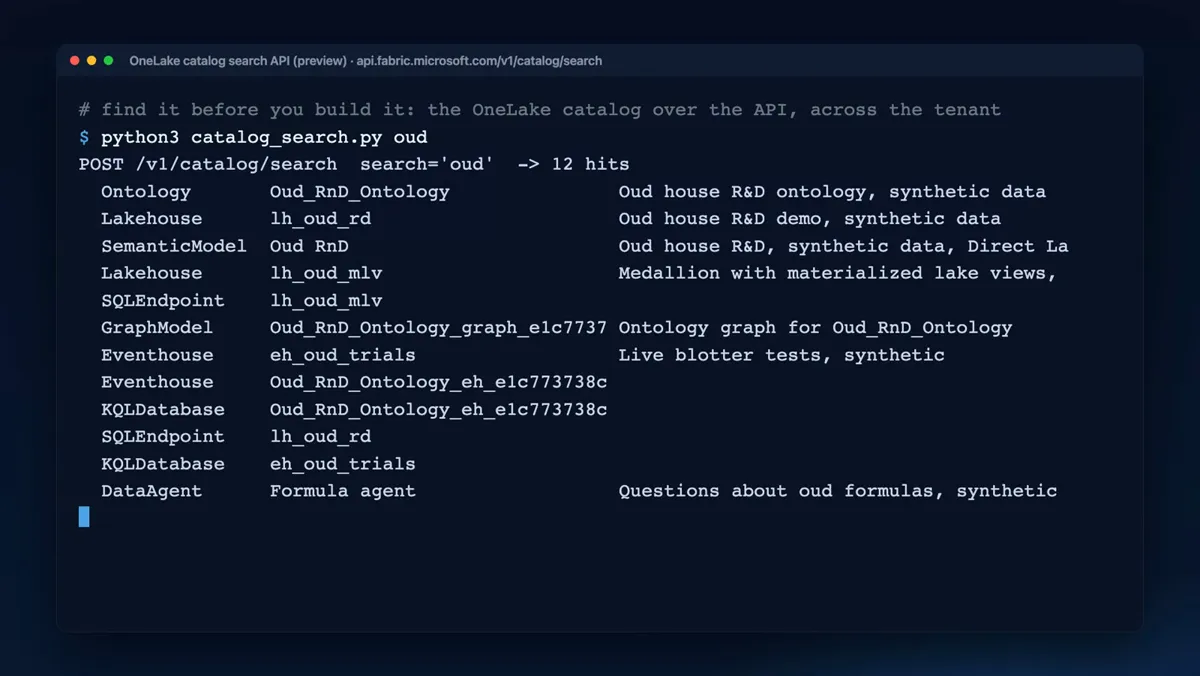
The clip runs three real calls in the synthetic demo tenant of a made-up oud perfume house.
- 0:00. A comment: find it before you build it, the OneLake catalog over the API, across the tenant.
- 0:05. A search for "oud" returns 12 hits across eight item types, from the ontology
Oud_RnD_Ontologyand the lakehouseslh_oud_rdandlh_oud_mlvto the data agent "Formula agent". - 0:14. A search for "synthetic", filtered to Lakehouse, SemanticModel, Ontology, and Eventhouse, returns 5 hits. The word sits in each description, not in any name.
- 0:23 to 0:29. The
search_catalogtool in Core MCP, withpageSize5, returns the same first five items in the same order as the API, plus a request ID.
"Formula agent" has no "oud" in its name and matched through its description. Five of the 12 hits are companion items with no description, such as the SQL analytics endpoints of both lakehouses and items with generated names that start with Oud_RnD_Ontology_. Use the type filter when you want primary items only.
Limits and catches of the catalog search API
The catch: search shows what exists, to everyone who may access the item. Learn's tenant setting "Users can find objects in search" adds tables and columns to search for anyone with access to the item that contains them. OneLake security does not guarantee that table metadata stays hidden. Access to an item is not access to its rows, but the names are visible.
The API is a preview. Figure 2 lists the request rules from the Learn reference. Two more points come from the clip. Search matches descriptions, so items without one are harder to find. The hit list also mixes in companion items, so filter by type.
POST …/v1/catalog/search

    {
(1)  "search": "synthetic",
(2)  "filter": "Type eq 'Lakehouse'
       or Type eq 'Eventhouse'",
(3)  "pageSize": 20
    }

    Response 200
    {
     "value": [ … ],
(4)  "continuationToken": "…"
}- 1search matches display name, workspace display name, and description. Quotes match a phrase,
*and?are wildcards, and&&requires every term. - 2filter takes Type and WorkspaceId with eq, ne, and, or, and parentheses. At most 500 Type values and 12 WorkspaceId values.
- 3pageSize runs from 1 to 1000. The default is 50.
- 4continuationToken goes alone on the next call, never with search or filter. A 429 response carries Retry-After in seconds.
Run the demo yourself
You need the items that python3 fabdemo.py up from the recap repo creates, so the search has something to find, and the Azure CLI signed in. Then run:
python3 fabdemo.py catalog-search oud
python3 fabdemo.py catalog-search synthetic Lakehouse,SemanticModel,Eventhouse
python3 fabdemo.py core-mcp call search_catalog '{"search":"oud","pageSize":5}'
Expected result: hits across item types for "oud", then only lakehouses, semantic models, and eventhouses whose description says synthetic, then the same search through MCP. Time and cost: about 2 minutes. No Fabric capacity needed. Full steps: runbook D14.
Your hit counts depend on the items in your tenant. The script joins the types into one filter with or and sends pageSize 20. The MCP call goes to https://api.fabric.microsoft.com/v1/mcp/core as a JSON-RPC tools/call. For what else that server can do, including its write tools, see Fabric Core MCP server.
What to do on Monday
On Monday: Check with catalog search whether a model or table already exists before an agent builds another copy.
Admins who want the estate-wide view of the same items, with labels and recommended actions, have it in OneLake catalog Govern.
Key facts at a glance
Checked on Microsoft Learn on November 3, 2026.
| ID | Fact | Source |
|---|---|---|
| K1 | POST https://api.fabric.microsoft.com/v1/catalog/search, in preview | Learn: Catalog - Search |
| K2 | Delegated scope Catalog.Read.All. Users, service principals, and managed identities. | Learn: Catalog - Search |
| K3 | Searches display name, workspace display name, and description | Learn: Catalog - Search |
| K4 | pageSize 1 to 1000, default 50. Filter: up to 500 Type and 12 WorkspaceId values. | Learn: Catalog - Search |
| K5 | Returns only items the caller may access. Entries grant no data access. | Learn: Catalog - Search |
| K6 | Same search as a tool in Fabric Core MCP, https://api.fabric.microsoft.com/v1/mcp/core | Learn: Fabric Core MCP Server |
| K7 | Table discovery in search: in preview | Learn: What's new in Fabric |
Frequently asked questions
How do I search for Microsoft Fabric items across workspaces from code?
Call the OneLake catalog search API: POST https://api.fabric.microsoft.com/v1/catalog/search with a search text, an optional type filter, and a page size. It returns IDs, types, names, descriptions, and workspaces for matching items across the tenant.
Does the OneLake catalog search API respect permissions?
Yes. It returns only workspaces and items the caller is authorized to access, for users, service principals, and managed identities alike. A hit is metadata only and grants no access to the data inside the item.
Is the OneLake catalog search API generally available?
No. The Microsoft Learn API reference says catalog search is in preview as of November 3, 2026. Microsoft first released it in preview in March 2026.
Can the Fabric catalog search API find tables and columns?
Yes, in preview. Microsoft Learn lists table discovery, which finds tables from semantic models, lakehouses, and mirrored databases by table name, description, or exact column name in global search and the Search API.
What is the search_catalog tool in Fabric Core MCP?
It is the catalog search exposed as a tool in the Fabric Core MCP server, so an AI agent can search the OneLake catalog by name, description, or workspace name. In the recap demo, it returned the same first five items as the REST API.
Sources
Microsoft Learn and the Microsoft Fabric blog, checked on November 3, 2026.
- Catalog - Search, Fabric REST API reference
- Search and explore items with OneLake catalog and Fabric REST APIs
- Fabric Core MCP Server overview
- What's new in Microsoft Fabric
- Tenant settings index: Users can find objects in search
- How OneLake security controls data access: metadata security
- Runbook D14: OneLake catalog search API
- FabCon Europe 2026 recap slides