FabCon Europe 2026 in 18 demos · Part 15 of 18 · Security and governance
Policies in Fabric: an allow list with no Deny
Tenant and capacity admins write rules that allow an action when conditions match. Anything no rule matches is blocked, so the first rule changes the default.
Microsoft Fabric policies are condition-based governance rules that a Fabric administrator or a capacity administrator activates for the whole tenant or for one capacity. Each rule names conditions, such as workspaces, security groups, or sensitivity labels, and one effect: Allow. When a policy has rules and none matches an action, Fabric blocks it. Every policy is an allow list. This post is part of FabCon Europe 2026 in 18 demos.
Three policies exist today. One governs sharing data outside the tenant, one governs which items people create on a capacity, and one governs which workspace admins may edit encryption and outbound networking settings. Policies are in preview, cost no capacity units, and are managed from the Govern tab of the OneLake catalog.
In short
- A Fabric policy is an allow list. Allow is the only effect you can write, and an action that matches no rule is blocked.
- The scope is the tenant or one capacity, fixed when you create the policy set. Only one policy is active per scope, and nothing applies until an admin activates it.
- The first Allow rule flips a policy from allow all to allow list. Add the rule that keeps everything else open in the same change.
What Fabric policies are and how they decide
A policy lives in a policy set, a Fabric item stored in a workspace. That gives policies REST APIs, Git integration, CI/CD, and service principal support. You choose the admin scope, tenant or capacity, when you create the policy set, and you cannot change it later. Anyone with permission on the item can edit rules. Only the admin of the scope can activate the policy, and Git cannot activate it.
Only one policy is active per scope. When a user attempts a governed action, the owning feature asks the policy engine for a verdict and enforces it.
The three policies available today
| ID | Policy | Scope | What it controls | Default |
|---|---|---|---|---|
| P1 | Allow external data sharing | Tenant | Who shares data outside the tenant, by group, workspace, label, and recipient domain | Overview: Block all. Policy page: the legacy tenant setting |
| P2 | Allow item creation | Capacity | Which item types users create in the capacity's workspaces | Allow all item types |
| P3 | Allow workspace settings editing | Tenant | Which workspace admins edit encryption and outbound networking settings | Allow editing of all settings |
Conditions come from a short list: workspaces, Microsoft Entra security groups, sensitivity labels with a No label option, recipient email domain, item type, and workspace setting type. P3 is the policy behind the demo. It decides who may change outbound access protection in the first place.
What the Fabric policies demo shows
- 0:00 The OneLake catalog is open on the Govern tab, with Policies (Preview) selected. The Scope pane lists Fabric tenant and, under Capacities, the demo capacity. A banner reads "Connect a policy set to make changes".
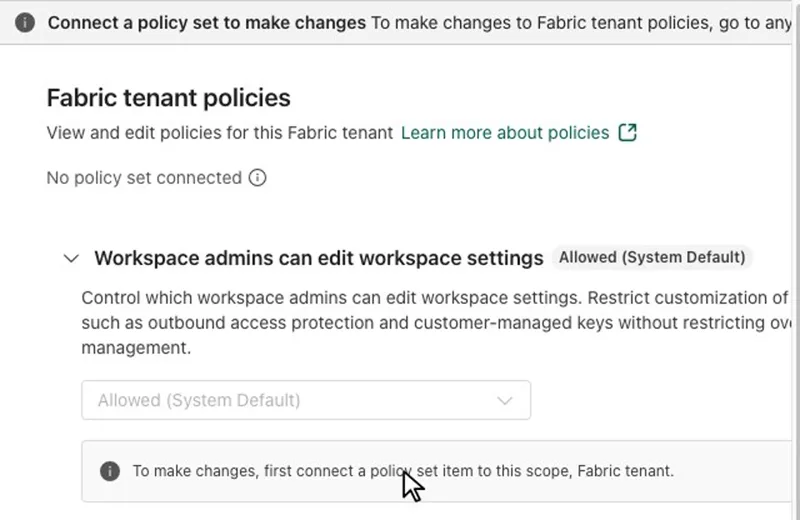
- 0:02 Fabric tenant is selected. The main pane shows Fabric tenant policies, "No policy set connected", and one row: Workspace admins can edit workspace settings, marked Allowed (System Default).
- 0:08 The row expands. The description names outbound access protection and customer-managed keys as the settings it can restrict. The value box reads Allowed (System Default) and is greyed out.
- 0:12 A note under it reads "To make changes, first connect a policy set item to this scope, Fabric tenant." The clip ends on that note at 0:16.
This is the default state of a tenant: one system policy, allowed for everyone, and nothing to edit until a policy set exists. The recording shows one tenant policy. Learn lists two at tenant scope, so the list in your tenant can differ.
Fabric policies limits and catches
The catch: the first Allow rule changes the default. In the workspace settings policy, switching to Advanced and adding one rule turns allow all into an allow list. Learn's example: a rule that allows editing customer-managed keys immediately blocks all other security settings, unless another rule allows them.
Before: Allowed (System Default)
| Admin | Encryption | Outbound |
|---|---|---|
| Key admins | Can edit | Can edit |
| Other admins | Can edit | Can edit |
After: Advanced, one rule lets Key admins edit Encryption
| Admin | Encryption | Outbound |
|---|---|---|
| Key admins | Can edit | Blocked |
| Other admins | Blocked | Blocked |
Fix in the same change. Add a second rule with setting type NoneOf Encryption and no group condition. Every workspace admin can edit outbound settings again, and encryption stays with Key admins.
- You cannot write a Deny rule. Blocking is the outcome when nothing matches, and the workspace settings policy also has a Blocked mode for all admins.
- Tenant settings win. Allowing an admin to edit a setting does not enable a capability that a tenant setting turned off.
- Learn lists West Europe, North Europe, and West US as capacity regions without support for now.
- Changes take effect within 15 minutes of activation. A tenant policy holds up to 100 rules, a capacity policy 50, and a condition up to 50 values.
- The defaults for external data sharing disagree. The overview table says Block all, while the policy page says the legacy tenant setting applies. Test before you rely on either.
Policies prevent. The OneLake catalog Govern tab, where the Policies center lives, shows what already drifted.
Run the Fabric policies demo yourself
You need the PolicySetTenantSwitch tenant setting, part of settings on in the recap demos folder, the Fabric administrator role, and a capacity outside West Europe, North Europe, and West US. Steps from runbook D12:
1. Open OneLake catalog > Govern > Policies (preview).
2. Switch between Fabric tenant and Capacities.
3. Open "Workspace admins can edit workspace settings" and read the note to connect a policy set first.
Expected result: the policy list per scope. Allow is the only effect, and there is no deny rule. Time and cost: about 3 minutes, no Fabric capacity needed.
Viewing needs no capacity. Creating a policy set does: Learn requires a workspace on a capacity and Contributor access or higher. This is Learn's own item creation example for one capacity:
Policy:  Allow item creation        Scope: one capacity
Rule 1:  Security groups  AnyOf  DataflowGen2-Creators
         Workspaces       AnyOf  Prod-Analytics, Prod-Reporting
         Item type        AnyOf  DataflowGen2
Rule 2:  Workspaces       NoneOf Prod-Analytics, Prod-Reporting
Rule 1 alone would block every other item creation across the capacity. Rule 2 keeps the other workspaces open.
What to do on Monday
On Monday: Pilot policies on one capacity.
Pick a capacity outside the unsupported regions. Test with one member and one nonmember of each group before you activate.
Key facts at a glance
Checked on Microsoft Learn on November 3, 2026.
| ID | Fact | Source |
|---|---|---|
| K1 | Microsoft Fabric policies are in preview. | Learn: What are Microsoft Fabric policies (preview)? |
| K2 | Allow is the only effect. If rules exist and none matches, the operation is denied. | Learn: What are Microsoft Fabric policies (preview)? |
| K3 | Scopes: Tenant, activated by a Fabric administrator. Capacity, activated by a capacity administrator. | Learn: What are Microsoft Fabric policies (preview)? |
| K4 | One active policy per scope. The scope cannot change after creation, and Git cannot activate a policy. | Learn: What are Microsoft Fabric policies (preview)? |
| K5 | Up to 100 rules per tenant policy, 50 per capacity policy, 50 values per condition. | Learn: What are Microsoft Fabric policies (preview)? |
| K6 | Changes take effect within 15 minutes of activation. | Learn: What are Microsoft Fabric policies (preview)? |
| K7 | Not supported yet in the capacity regions West Europe, North Europe, and West US. | Learn: What are Microsoft Fabric policies (preview)? |
| K8 | Included with the Fabric license. Policies do not consume capacity units. | Learn: What are Microsoft Fabric policies (preview)? |
Frequently asked questions
What are Microsoft Fabric policies?
Fabric policies are governance rules that a Fabric administrator or a capacity administrator activates for the tenant or for one capacity. Each rule combines conditions, such as workspaces, security groups, or sensitivity labels, with an Allow effect. They are in preview as of November 3, 2026.
Can a Fabric policy deny an action?
You cannot write a Deny rule, because Allow is the only effect. Blocking is implicit: once a policy has rules, Fabric blocks any action that matches none of them. The workspace settings policy also offers a Blocked mode that stops all workspace admins from editing the governed settings.
What is the difference between tenant and capacity scope in Fabric policies?
A tenant-scoped policy applies across the whole organization, and a Fabric administrator activates it. A capacity-scoped policy applies to the workspaces on one capacity, and a capacity administrator activates it. You choose the scope when you create the policy set and cannot change it later.
Which policies are available in Microsoft Fabric?
Three, as of November 3, 2026: Allow external data sharing at tenant scope, Allow item creation at capacity scope, and Allow workspace settings editing at tenant scope. The last one controls which workspace admins can edit customer-managed keys and outbound networking settings.
How are conditions combined in a Fabric policy rule?
Conditions within one rule combine with AND. Values within a condition combine with OR for AnyOf and NOR for NoneOf. Separate rules combine with OR, and a condition you leave out matches everything.
Why can't I use Fabric policies on my capacity?
Microsoft Learn lists West Europe, North Europe, and West US as capacity regions where Fabric policies are not supported yet. A Fabric administrator must also turn on the Policies tenant setting, which can be limited to specific security groups.
Sources
Microsoft Learn and the recap repository, checked on November 3, 2026.
- What are Microsoft Fabric policies (preview)?
- Create and activate a Fabric policy
- Microsoft Fabric policy: Allow workspace settings editing
- Control item creation on a Fabric capacity
- Govern external data sharing across your tenant
- What's new in Microsoft Fabric
- Runbook D12: Policies in Fabric (recap repository)
- FabCon Europe 2026 recap: status table and FAQ (recap repository, status as of October 21, 2026)