FabCon Europe 2026 in 18 demos · Part 8 of 18 · Agents
Project Osmos: a data engineering agent that plans, runs, and checks
One written outcome becomes notebooks, a Delta table, and validation checks that run on SparkCore under your own Fabric permissions.
Project Osmos is the data engineering agent in Microsoft Fabric, called the Fabric data engineering agent on Microsoft Learn. You give it one written outcome from a coding agent in your terminal. It plans the work, writes and runs Spark notebooks in a Fabric task on SparkCore, and validates the result against your checks.
It is the first agent in FabCon Europe 2026 in 18 demos that writes to your lakehouse on its own. So identity and limits matter more than the prompt.
In short
- Osmos takes one outcome from GitHub Copilot CLI, Claude Code, or Codex, then plans, runs, and validates the work as a Fabric task on SparkCore, under your identity.
- You accept eight settings first, including permission boundary, safety pattern, rerun semantics, and schema evolution. The card guides. Fabric and OneLake permissions enforce.
- It is preview with no SLA and does not run in a workspace with outbound access protection. Pilot it on a development workspace.
What Project Osmos is and how it works
A Project Osmos task is a managed unit of work, not a chat reply. Your coding agent, with the Skills for Fabric plug-in, resolves the workspace and lakehouse by name, collects the settings, and creates one remote task. The task keeps running when your laptop is off. Learn names the lifecycle define, plan, execute, validate, and monitor.
The named lakehouse hosts the task and is the default lakehouse of the Spark session. It is not a fence. The task reaches any resource you can reach, in any workspace, on your behalf. Anyone with access to the lakehouse can follow the task and give it input.
What the Project Osmos demo shows
Four synthetic tables go in, one gold table comes out. The recording cuts the wait.
- 0:00
- The coding agent, Claude Code here, reports the task as running in lh_oud_rd. The runbook uses GitHub Copilot CLI.
- 0:02
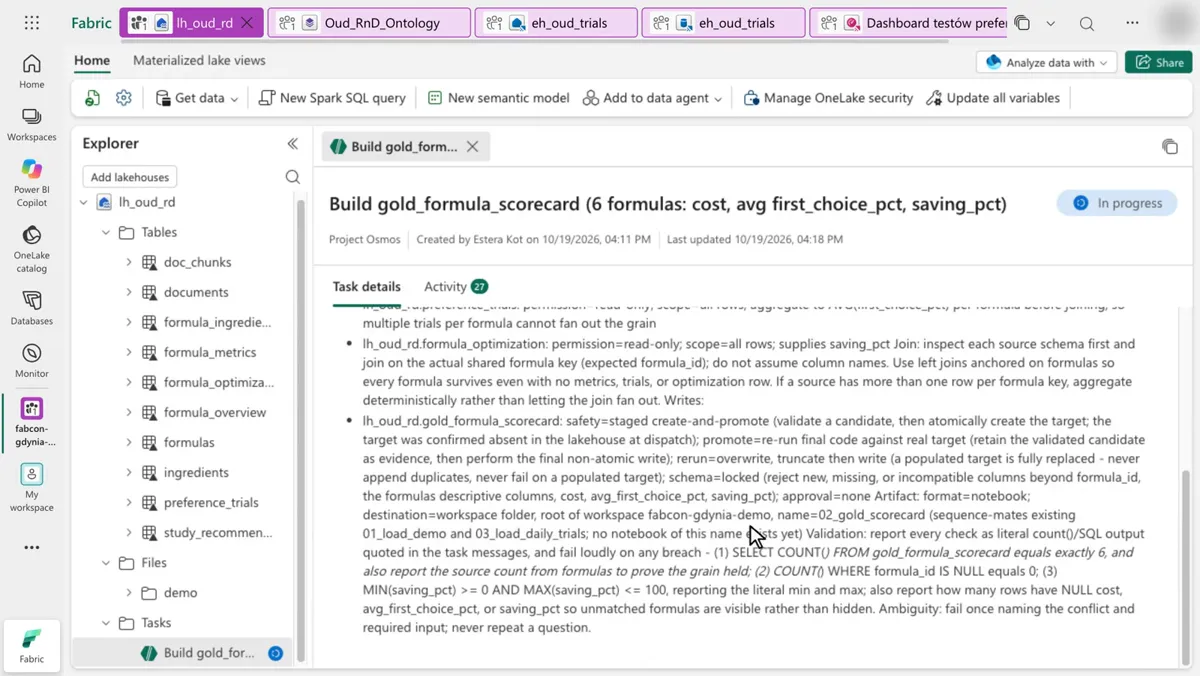
- The task page opens in the lakehouse. The outcome is the Polish prompt. The execution plan marks every source table read-only.
- 0:04
- One plan line protects the grain: average first_choice_pct per formula before the join, so two trials cannot duplicate a formula.
- 0:08
- The write rules: staged create-and-promote, rerun by overwrite, locked schema, notebook 02_gold_scorecard. Validation: exactly 6 rows, no null formula_id, saving_pct between 0 and 100.
- 0:12
- The Activity tab shows the PySpark code that counts nulls.
- 0:22
- Succeeded. Created 4:11 PM, updated 4:27 PM, so about 16 minutes of work. The table gold_formula_scorecard appears.
- 0:30
- Six rows. At 0:36, OB-105 Oud Plantation shows 52.5, the mean of its trials, 44 and 61. Osmos averaged before the join, as planned.
The Project Osmos settings card: permissions, safety, reruns, schema
Before the run, Osmos recommends eight settings, and you can change any of them. Figure 2 shows the values the demo used.
- Permission boundaryRead-only or writable, per resourceFour sources read-only, gold table writable
- Safety patternStaging, clone-and-promote, or in placeStaged create-and-promote
- Promote stepHow staged output becomes finalRerun final code on the real target
- Rerun semanticsFail, append, deduplicate, or replaceOverwrite: truncate, then write
- Schema evolutionCan the output schema changeLocked
- Artifact formatNotebook or other artifactNotebook
- Artifact destinationWhere artifacts goWorkspace root
- Reasoning effortHow widely it exploresMedium
Enforcement layer. Fabric workspace roles and OneLake security. The card cannot widen it.
Read the four red settings like a pipeline design. Rerun semantics decide idempotency: overwrite suits a full rebuild of a small gold table and breaks an incremental load. Schema evolution decides whether a new column fails the run. The safety pattern decides whether a bad run touches the target.
The permission boundary only guides. Learn states that Fabric and OneLake permissions remain the enforcement boundary. A table marked read-only on the card is protected only if your role cannot write it.
Project Osmos limits and catches
The catch: Osmos is not available for workspaces with outbound access protection enabled. The workspaces you lock down hardest cannot host it, so a pilot lands somewhere less protected. See outbound access protection.
- Preview: not for production, no SLA, possibly only in selected regions.
- No Fabric trial capacities. Contributor or higher on the workspace.
- Two cost parts: tokens on the Copilot and AI meter, and Spark compute, reported separately.
- Another workspace on the same capacity gives no compute isolation.
For declarative medallion layers that drop bad rows, compare materialized lake views. For coding agents that change workspaces through MCP tools, see the Fabric Core MCP server.
Run the Project Osmos demo yourself
You need a non-trial capacity, a workspace without outbound access protection, lh_oud_rd from the recap repo setup script, Contributor or higher, the Azure OpenAI tenant setting, and Azure CLI.
az login
copilot
/plugin marketplace add microsoft/skills-for-fabric
/plugin install fabric-skills@fabric-collection
/skills
After a restart, check that project-osmos is listed. Send the prompt from runbook D06 and accept the settings card.
Create a Project Osmos task in the workspace <your workspace> and the lakehouse lh_oud_rd. Build a gold table gold_formula_scorecard with one row per formula: formula name, cost per kg, average first-choice share across all trials, and the optimizer saving in percent. Use the tables formulas, formula_metrics, preference_trials, and formula_optimization. Save the logic as a notebook 02_gold_scorecard. Validate one row per formula, no null costs, and shares between 0 and 100.Expected result: six rows, with OB-105 at 52.5. Time and cost, as the runbook states: about 20 minutes. The task runs on the capacity for about 15 minutes.
What to do on Monday
On Monday: Pilot Project Osmos on a development workspace, not on production.
The task reaches whatever your account reaches, so pilot with an account that cannot write production data.
Key facts at a glance
Checked on Microsoft Learn on November 3, 2026.
| ID | Fact | Source |
|---|---|---|
| K1 | Preview: not for production, no SLA, possibly selected regions only. | Learn: Overview |
| K2 | Started from GitHub Copilot CLI, Claude Code, or Codex. Not from Copilot in the Fabric portal. | Learn: Get started |
| K3 | Persistent task on SparkCore. Keeps running after the client disconnects. | Learn: Overview |
| K4 | Eight settings: permission boundary, safety pattern, promote step, rerun semantics, schema evolution, artifact format, artifact destination, reasoning effort. | Learn: Get started |
| K5 | Fabric and OneLake permissions enforce. The permission boundary setting guides. | Learn: Best practices |
| K6 | No trial SKU. Contributor or higher. Azure OpenAI tenant setting on. | Learn: Get started |
| K7 | Not available with outbound access protection enabled. | Learn: Current limitations |
| K8 | Tokens on the Copilot and AI meter, Spark compute reported separately. | Learn: Consumption |
Frequently asked questions
What is Project Osmos in Microsoft Fabric?
Project Osmos is the Fabric data engineering agent, in preview. It takes one outcome from a coding agent such as GitHub Copilot CLI, then plans, runs, and validates the work as a persistent Fabric task on SparkCore.
Can I use Project Osmos in production?
Not yet. Microsoft Learn labels Project Osmos preview, not intended for production use, and not covered by a service-level agreement. Pilot it on a development workspace.
What permissions does Project Osmos run with?
Project Osmos acts on behalf of the person who started the task and can reach any resource that person can reach, in any workspace. Fabric and OneLake permissions enforce the limits. The permission boundary on the settings card only guides.
Why can't I use Project Osmos in my workspace?
Project Osmos is not available for workspaces with outbound access protection enabled, and Fabric trial capacities are not supported. You also need Contributor or higher on the workspace and the Azure OpenAI tenant setting for Copilot.
How much does a Project Osmos task cost?
A task consumes language model tokens and Spark compute. Tokens appear as the Project Osmos operation on the Copilot and AI meter. Spark usage is reported separately in the Capacity Metrics app.
Sources
Microsoft Learn and the Microsoft Azure blog, checked on November 3, 2026.
- What is Fabric data engineering agent (Project Osmos)?
- Get started with Fabric data engineering agent (Project Osmos)
- Best practices for the Fabric data engineering agent (Project Osmos)
- Project Osmos capacity consumption
- Workspace outbound access protection overview
- FabCon and SQLCon 2026 in Barcelona, Microsoft Azure blog
- Runbook D06, FabCon Barcelona 2026 recap repo