FabCon Europe 2026 in 18 demos · Part 13 of 18 · Security and governance
OneLake security: define RLS and CLS once, enforce them everywhere
Roles, row rules, and hidden columns live with the data in OneLake, and every Fabric engine reads the same rules, shortcuts included.
OneLake security is the data-plane permission model of Microsoft Fabric. You define roles on a lakehouse, scope them to tables, folders, rows, and columns, and OneLake enforces them in every Fabric engine that reads the data. Workspace roles decide what someone can do to an item. OneLake security decides which data they see. One role definition replaces separate rules in Spark, the SQL analytics endpoint, and Power BI. This post is part of FabCon Europe 2026 in 18 demos.
The catch sits in the defaults. Every lakehouse starts with a role called DefaultReader, and roles bind only Viewers and users with item permissions. Admins, Members, and Contributors read everything, whatever the roles say.
In short
- OneLake security roles grant Read or ReadWrite on tables and folders, with row-level and column-level rules. Fabric engines enforce them at query time, also through shortcuts.
- Roles restrict only Viewers and users with item permissions. Workspace Admins, Members, and Contributors keep full read and write access.
- Every lakehouse starts with DefaultReader, which gives all ReadAll users the whole lakehouse. Take users out of it before a restricted role can restrict them.
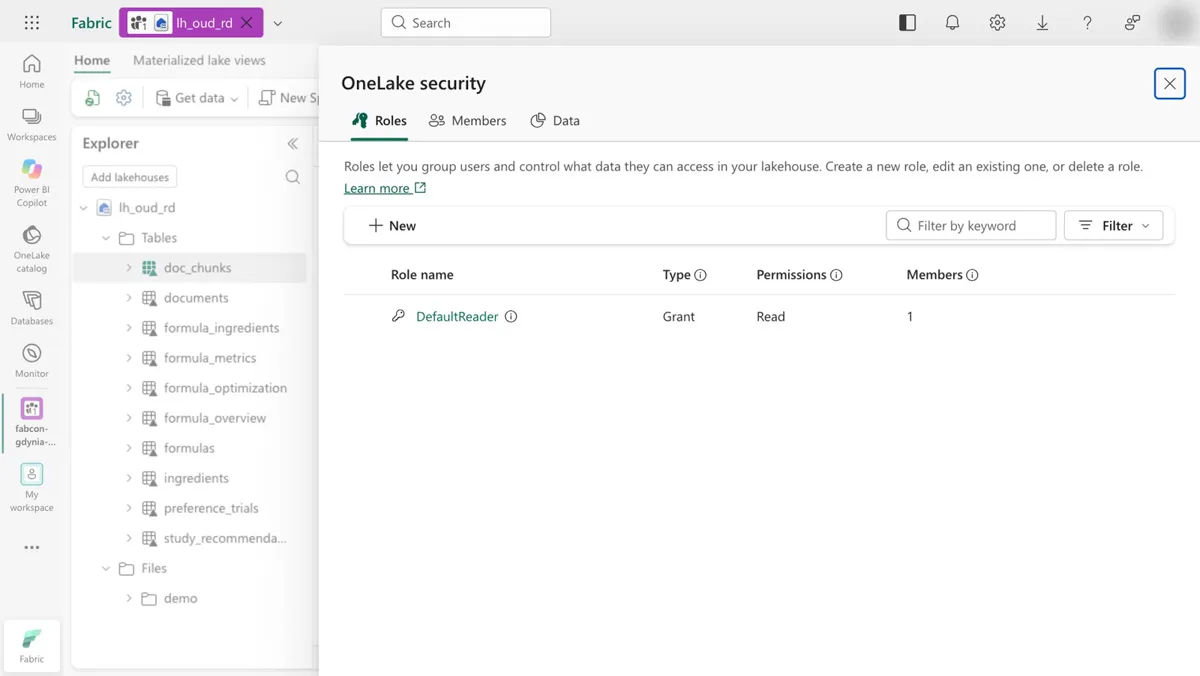
lh_oud_rd: one role, DefaultReader, with type Grant, permission Read, and one member. 14 seconds, no sound, recorded Oct 19, 2026.What OneLake security is and how roles, RLS, and CLS work
OneLake enforces permissions on two planes. Workspace roles and item permissions form the control plane, which governs what you can do to an item. OneLake security is the data plane, which governs which data you can read or write.
A role has four parts: a permission (Read or ReadWrite), a type (always Grant, there are no Deny roles), the data (tables, folders, or schemas, with optional row and column rules), and members (Microsoft Entra users, groups, or nonuser identities). Access is deny by default. Workspace Admins and Members create the roles.
How OneLake combines roles and shortcuts
Inside one role, OneLake intersects the tables, the row rule, and the column rule. Across roles, it takes the union, so two row rules on the same table combine with OR. Through a shortcut, OneLake resolves the shortcut roles and the target roles separately and intersects them. A shortcut cannot widen what the target allows.
Enforcement happens in the engine. Learn lists six Fabric engines that filter with RLS and CLS, all GA: Graph in Fabric, Lakehouse, Direct Lake on OneLake semantic models, Spark notebooks, the SQL analytics endpoint in user's identity access mode, and eventhouse. The OneLake Table Read API applies the same rules over REST, in preview.
An external engine that is not registered as an authorized engine counts as direct user access. If the user may not see every row and column, OneLake blocks the query. Keep that in mind when other tools read your tables through the Unity Catalog and Iceberg REST endpoints.
What the OneLake security demo shows
The clip stays on one screen: the starting state of every new lakehouse.
- 0:00 The lakehouse
lh_oud_rdis open with the OneLake security pane. The Explorer lists ten tables, fromdoc_chunksandformulastopreference_trials. - 0:00 The pane has three tabs: Roles, Members, and Data. The Roles tab shows one role, DefaultReader, with type Grant, permission Read, and 1 member.
- 0:06 The cursor moves toward the role list. The view holds until 0:14.
No custom role exists, and that is the point. A new lakehouse already grants Read on everything to every user with the ReadAll permission. The Explorer also shows tables directly under Tables, with no schema folder, so lh_oud_rd is a lakehouse without schemas.
OneLake security limits and catches
The catch: roles only add access. DefaultReader grants Read on the whole lakehouse to every user with ReadAll. Put such a user in a role that shows one table, and the union still gives them everything. Learn's fix: remove those users from DefaultReader, or edit or delete DefaultReader, before a restricted role restricts anyone.
| Who | Edits roles | Reads data without a role | Filtered by RLS and CLS |
|---|---|---|---|
| Workspace Admin | Yes | Yes, all data | No |
| Workspace Member | Yes | Yes, all data | No |
| Workspace Contributor | No | Yes, all data | No |
| OneLake security roles bind below this line | |||
| Workspace Viewer | No | No | Yes |
| Read permission on the item | No | No | Yes |
| ReadAll permission on the item | No | Yes, all of it, through DefaultReader | Yes, once DefaultReader no longer covers them |
- Test with a Viewer account. Your own Admin account bypasses every role.
- Keep a table's RLS and CLS in one role. Splitting them across roles returns query errors, and ReadWrite roles carry neither.
- Use schema-enabled lakehouses. Without schemas, tables with RLS or CLS lose data preview, and the demo lakehouse has no schemas.
- Switch the SQL analytics endpoint to user's identity access mode. In delegated mode it reads with the owner's identity.
- Expect shortcut names to show. A folder listing returns every OneLake shortcut, whatever your access to its target, but the data stays filtered.
- Turn on the tenant setting Users can access data stored in OneLake with apps external to Fabric. Shortcuts with OneLake security need it.
- Plan for delays. Role edits take about 5 minutes, group membership changes about an hour.
Roles decide who reads a table. Outbound access protection decides where data can go once someone has read it.
Run the OneLake security demo yourself
You need the lakehouse lh_oud_rd from the up script in the recap demos folder and the Admin or Member workspace role. Steps from runbook D10:
1. Open lh_oud_rd and select Manage OneLake security.
2. Open the DefaultReader role. It grants Read to everyone with the ReadAll permission.
3. Check Members. Before you add a restricted role, remove its users from DefaultReader, or they keep full access.
Expected result: the role list with DefaultReader, its Read permission, and its virtual members. Time and cost: about 3 minutes, on the F8 capacity from up.
To watch a row rule work, add your own role. This example is not in the recording.
Role:        GulfLineReaders, permission Read
Data:        table formulas
Row rule:    SELECT * FROM formulas WHERE line = 'gulf'
Members:     a test account that has Read on the lakehouse, not ReadAll
Query formulas as that account. Then give the same account ReadAll and query again. DefaultReader now covers it, and the union returns every row.
What to do on Monday
On Monday: Turn on OneLake security on one lakehouse and check that shortcuts respect it.
Pick a lakehouse that another workspace already reads through a shortcut, and run the check as a Viewer on the shortcut side.
Key facts at a glance
Checked on Microsoft Learn on November 3, 2026.
| ID | Fact | Source |
|---|---|---|
| K1 | RLS and CLS filtering: GA in six Fabric engines, public preview for authorized third-party engines and the Table Read API. | Learn: Read data secured with OneLake security |
| K2 | Roles are Grant only, with no Deny. Access is deny by default. | Learn: How OneLake security controls data access |
| K3 | Lakehouses support Read and ReadWrite. Mirrored items support Read. | Learn: Create and manage OneLake security roles |
| K4 | Roles restrict Viewers and Read users. Admins, Members, and Contributors are not affected. | Learn: Data security in OneLake |
| K5 | Every lakehouse has DefaultReader, which grants Read to all ReadAll users. | Learn: How OneLake security controls data access |
| K6 | 250 roles per item, up to 1,000 on request. 500 members and 500 permissions per role. | Learn: How OneLake security controls data access |
| K7 | Role edits apply in about 5 minutes, group membership changes in about an hour. | Learn: How OneLake security controls data access |
| K8 | An RLS rule holds at most 1,000 characters. Spark needs Fabric runtime 1.3. | Learn: RLS syntax and access control model |
Frequently asked questions
Is OneLake security generally available?
As of November 3, 2026, Microsoft Learn labels row-level and column-level security filtering GA in six Fabric engines, including Spark notebooks, Lakehouse, Direct Lake on OneLake, and the SQL analytics endpoint in user's identity mode. Authorized third-party engines and the OneLake Table Read API are in public preview. Learn gives no single GA date.
What is the DefaultReader role in OneLake security?
DefaultReader is a role that Fabric creates in every lakehouse. It grants Read on all data in the lakehouse to every user with the ReadAll permission, through virtual members. If you delete it, those users lose data access unless another role grants it.
Does OneLake security restrict workspace Admins and Contributors?
No. OneLake security roles restrict users with the Viewer workspace role or Read permission on the item. Workspace Admins, Members, and Contributors read and write all data in the workspace, whatever the roles say. Test row and column rules with a Viewer account.
Does OneLake security work through shortcuts?
Yes. For a OneLake-to-OneLake shortcut, OneLake resolves the roles at the shortcut and at the target separately and grants only their intersection. Passthrough shortcuts use the caller's identity. Delegated shortcuts combine the caller's access on the shortcut path with the connection identity's access on the target.
Can I combine row-level and column-level security in OneLake?
Yes, but only inside one role. OneLake does not support a user who belongs to one role with a row rule on a table and another role with a different set of columns on the same table, and such queries return errors. Roles with ReadWrite permission cannot carry RLS or CLS.
How long do OneLake security role changes take to apply?
Changes to a role definition take about 5 minutes. Changes to the membership of a group in a role take about an hour, and some Fabric engines cache access for up to another hour.
Sources
Microsoft Learn and the recap repository, checked on November 3, 2026.
- Data security in OneLake
- How OneLake security controls data access
- Create and manage OneLake security roles
- Table, column, and row-level security in OneLake
- Read data secured with OneLake security
- Row-level security syntax reference
- OneLake security integrations overview (preview)
- Runbook D10: OneLake security roles (recap repository)
- FabCon Europe 2026 recap: status table and FAQ (recap repository, status as of October 21, 2026)