FabCon Europe 2026 in 18 demos · Part 5 of 18 · Reading Fabric data from outside Fabric
OneLake Table Read API: REST reads that respect row security
An app reads a lakehouse table over REST, gets Apache Arrow back, and sees only the rows and columns OneLake security allows.
The OneLake Table Read API is a REST endpoint that returns rows from a Delta Lake or Apache Iceberg table in OneLake as Apache Arrow streams. It enforces OneLake authorization, row-level security (RLS), and column-level security (CLS) for the identity behind the bearer token. Your app receives only the rows and columns that identity may see, with no Spark cluster, no SQL endpoint, and no copy of the data.
Before this API, an app outside Fabric either ran a query engine or copied the data out and rebuilt the security rules. This API is a third option, one of the doors covered in FabCon Europe 2026 in 18 demos.
In short
- One POST /read opens a session over one snapshot of the table. One GET /readStream per stream returns Apache Arrow batches.
- OneLake security filters rows and columns on the server, for the caller's identity. A table or column the caller cannot see comes back as not found.
- The API is in public preview. Each POST /read is billed by rows scanned, not rows returned.
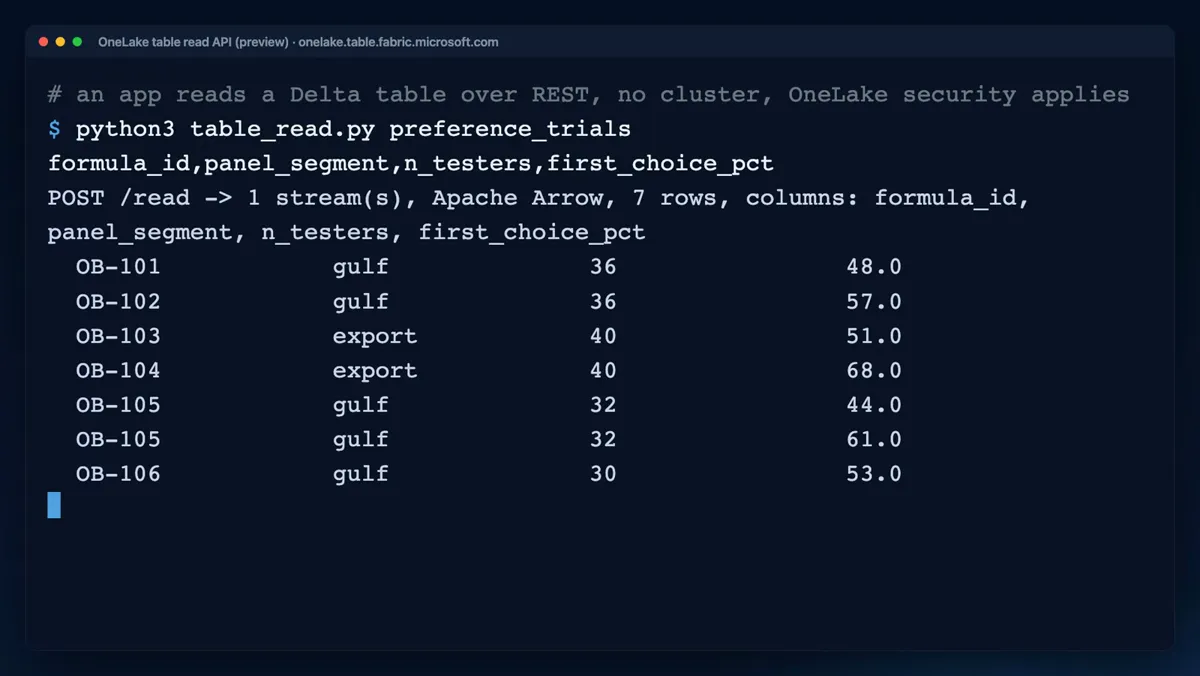
preference_trials table and gets back one Apache Arrow stream with seven rows. 14 seconds, no sound, recorded Oct 21, 2026.What the OneLake Table Read API is and how it works
The API runs on onelake.table.fabric.microsoft.com, the same host as the catalog endpoints in Unity Catalog and Iceberg REST on OneLake. It accepts a user or service principal token for the OneLake audience, https://storage.azure.com. The first call opens a read session and names the columns:
POST https://onelake.table.fabric.microsoft.com/v1.0/workspaces/<WorkspaceID>/items/<ItemID>/schemas/<SchemaName>/tables/<TableName>/read
Authorization: Bearer <token for https://storage.azure.com>
Content-Type: application/json

{"columns": ["formula_id", "panel_segment", "n_testers", "first_choice_pct"]}
The response lists opaque stream identifiers. The second call runs once per identifier and returns an Apache Arrow IPC stream:
GET https://onelake.table.fabric.microsoft.com/v1.0/workspaces/<WorkspaceID>/items/<ItemID>/schemas/<SchemaName>/tables/<TableName>/readStream/<StreamID>
Authorization: Bearer <same token>
Every stream carries the same snapshot, even if a pipeline writes mid-read. Large results split into several streams that download in parallel. The session expires after 60 minutes.
The filtering happens on the server. OneLake checks the token's identity against OneLake security before your app reads a single batch. For RLS, the API materializes the filtered result in a hidden OneLake location. Rows the caller may not see never enter a stream, so your app never rebuilds the rules.
What the demo shows
The clip is a real call against lh_oud_rd, the synthetic lakehouse of a made-up oud perfume house.
- 0:00. A comment: an app reads a Delta table over REST, no cluster, OneLake security applies.
- 0:03. The command asks for
preference_trialsand four of its nine columns:formula_id,panel_segment,n_testers,first_choice_pct. - 0:07. POST /read returned one stream, Apache Arrow, seven rows, and exactly those four columns.
- 0:08 to 0:13. All seven trials stay on screen. OB-104 leads at 68.0 first choice. OB-105 appears twice, at 44.0 and 61.0, because two studies tested it.
The clip proves server-side column projection with no engine on the client. It does not show a restricted caller, because the demo identity could read the whole table.
To see RLS at work, add a role with a row filter, as in OneLake security: define RLS and CLS once, and call as a member of that role. Do not test as an admin: per Learn, workspace Admin, Member, and Contributor roles are not restricted by RLS or CLS.
When to use the Table Read API instead of Iceberg REST or the SQL endpoint
Three doors read Fabric tables from outside. They differ in who runs the query and who applies OneLake security.
| ID | Door | Returns | RLS and CLS | Use it when |
|---|---|---|---|---|
| W1 | Table Read API | Arrow rows | Filtered by OneLake, per caller | An app needs rows without running an engine |
| W2 | Iceberg REST or Unity Catalog API | Metadata. Your engine reads the files. | Not filtered. Restricted users are blocked. | An external engine queries in place |
| W3 | SQL analytics endpoint | T-SQL results | Filtered in user's identity access mode | A BI tool needs joins and aggregates |
The Table Read API returns rows, not answers: one sum over a million rows means scanning and downloading all of them. Full comparison: Unity Catalog and Iceberg REST on OneLake.
Limits and catches of the Table Read API
The catch: it is a public preview, billed by rows scanned, not rows returned. Learn's read page says "You're billed for the POST /read operation," and its consumption page says "Calls to the table read API are billed to the calling user." Each POST /read costs 8 CU seconds per million rows scanned, rounded up to the next million. RLS can scan far more rows than it returns.
The hidden copy of RLS-filtered results is billed as storage for seven days. Four more behaviors trip up client code:
- Not found does not mean missing. A table the caller cannot see returns not found, so never use it as an existence check.
- Named columns fail hard, wildcards fail soft. Name a column that CLS hides, and the request returns not found. Use a wildcard, and hidden columns drop out silently.
- 200 OK is a start, not a finish. A connection reset mid-body means a failed stream, even after valid batches.
- Row order is not guaranteed. Cross-region shortcuts are not supported either.
| ID | Caller | Response | What the app sees |
|---|---|---|---|
| O1 | Can read the whole table, as in the demo | Arrow | Every row |
| O2 | RLS allows some rows | Arrow | Only the allowed rows |
| O3 | CLS hides a column, wildcard request | Arrow | Hidden column gone, no error |
| O4 | RLS allows no rows | Success | Empty Arrow response |
| O5 | Names a column CLS hides | Not found | The request fails |
| O6 | No permission on the table | Not found | As if the table did not exist |
Run the Table Read API demo yourself
You need a test tenant, the Azure CLI signed in with az login, Python 3.9 or later with requests and pyarrow, and the tables that python3 fabdemo.py up from the recap repo loads into lh_oud_rd. Then run:
python3 fabdemo.py table-read preference_trials formula_id,panel_segment,n_testers,first_choice_pctExpected result: one Arrow stream with the seven preference trials and only the four requested columns. Time and cost: about 1 minute. Runbook D05 says each POST /read is "billed to the capacity," which differs from Learn's "billed to the calling user," and Learn's wording is what counts. Full steps: runbook D05.
The script takes its token from az account get-access-token --resource https://storage.azure.com and opens each stream with pyarrow.ipc.open_stream. It omits the /schemas/<SchemaName>/ segment, which the demo lakehouse accepted. Use the documented route in new code.
What to do on Monday
On Monday: Pilot the Table Read API for apps that copy data out of Fabric today.
A copy that feeds an app costs twice: once for the copy, once for its second set of security rules. Pilot one app on one table and test as a role member.
Key facts at a glance
Checked on Microsoft Learn on November 3, 2026.
| ID | Fact | Source |
|---|---|---|
| K1 | Status: public preview | Learn: Read OneLake table data |
| K2 | Host onelake.table.fabric.microsoft.com, token audience https://storage.azure.com | Learn: OneLake table APIs |
| K3 | POST …/read, then GET …/readStream/{streamId} per stream, Apache Arrow IPC | Learn: Read OneLake table data |
| K4 | Delta Lake and Apache Iceberg tables, one snapshot per session | Learn: OneLake table APIs |
| K5 | OneLake authorization, RLS, and CLS per caller. Hidden tables and columns return not found. | Learn: Read OneLake table data |
| K6 | Session expires after 60 minutes. No cross-region shortcuts. | Learn: Read OneLake table data |
| K7 | 8 CU seconds per million rows scanned per POST /read, billed to the calling user. RLS results kept seven days. | Learn: OneLake consumption |
Frequently asked questions
What is the OneLake Table Read API?
The OneLake Table Read API is a REST endpoint in Microsoft Fabric that returns rows from a Delta Lake or Apache Iceberg table as Apache Arrow streams. The calling app needs no Spark cluster and no SQL endpoint.
Does the OneLake Table Read API enforce row-level security?
Yes. It enforces OneLake authorization, row-level security, and column-level security for the identity behind the bearer token, on the server. The app receives only the rows and columns that identity may see.
Is the OneLake Table Read API generally available?
No. Microsoft Learn lists the OneLake Table Read API as a public preview on November 3, 2026, and says features and behavior might change before general availability.
How much does the OneLake Table Read API cost?
Each POST /read to the OneLake Table Read API consumes 8 CU seconds per million rows scanned, rounded up to the next million. Microsoft Learn says calls are billed to the calling user, and downloading the streams carries no separate charge.
Why does the Table Read API return not found for a table that exists?
The caller has no permission on the table, or the request names a column that column-level security hides. Both cases return not found, so not found never proves that a table is missing.
Sources
Microsoft Learn and the Microsoft Fabric blog, checked on November 3, 2026.